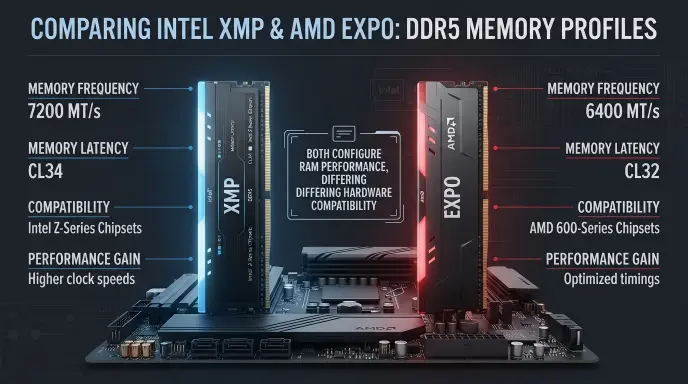
Choosing between XMP or EXPO can be confusing when building or upgrading a gaming PC, especially if you want the best RAM speed, stability, and overall performance. Both technologies help users enable optimized memory settings without manually adjusting every timing and frequency in the BIOS. However, Intel XMP and AMD EXPO are designed with different processor platforms in mind, which makes compatibility an important consideration. So, which one should you choose, and does the right memory profile actually make a difference in everyday computing or gaming?
Understanding the difference between Intel XMP and AMD EXPO starts with knowing how your processor, motherboard, and RAM work together. Intel XMP, or Extreme Memory Profile, provides predefined memory settings, while AMD EXPO, or Extended Profiles for Overclocking, offers optimized memory profiles primarily for compatible AMD platforms. Both can help supported DDR4 or DDR5 systems, depending on the specific hardware and profile version, run memory at advertised speeds beyond standard default settings.
In this guide, we will compare XMP vs EXPO in terms of performance, compatibility, gaming benefits, stability, and ease of use. You will also learn how to select the appropriate profile, what to check before enabling it, and why advertised RAM speeds are not guaranteed on every system. By understanding these practical differences and checking your hardware manufacturer’s specifications, you can make a more informed decision and choose the memory settings that best suit your PC build.
XMP vs EXPO: What Is the Difference?
XMP and EXPO are memory profile technologies that store predefined RAM settings, including frequency, timings, and voltage information. Consequently, a compatible motherboard can apply these settings through its firmware instead of requiring you to adjust every value manually.
Intel developed XMP for memory performance configuration, whereas AMD introduced EXPO to support straightforward memory overclocking, particularly on its DDR5 desktop platform. Both technologies aim to make higher memory performance more accessible.
Neither term refers to a different type of RAM chip. Instead, each describes a method of communicating performance settings that a compatible system can apply.
What Is XMP?
XMP stands for Extreme Memory Profile. It is a technology associated with Intel that allows compatible memory modules to provide predefined performance settings to the motherboard.
Ordinarily, RAM starts with conservative standard settings designed for broad compatibility. However, a memory kit advertised at a higher speed may include an XMP profile containing the settings required to reach that rated performance.
For example, a compatible DDR5 memory kit advertised at 6000 MT/s might initially operate at a lower standard speed. After enabling a suitable XMP profile in the motherboard firmware, the system may run the memory at its advertised rate.
Nevertheless, the final result depends on the processor, motherboard, memory kit, and firmware support.
What Is EXPO?
EXPO stands for Extended Profiles for Overclocking. AMD introduced this technology to simplify memory performance configuration, particularly for compatible DDR5 systems using its AM5 desktop platform.
Like XMP, EXPO stores predefined memory settings that the motherboard can apply automatically. Therefore, users can access a memory kit’s intended performance without manually entering every timing and voltage value.
For instance, a compatible DDR5 kit with an EXPO profile may offer a convenient way to configure memory for an AMD Ryzen desktop system.
However, EXPO support does not guarantee that every memory kit will achieve its advertised speed on every motherboard. The complete hardware combination still matters.
XMP vs EXPO Comparison Table
| Feature | Intel XMP | AMD EXPO |
|---|---|---|
| Full name | Extreme Memory Profile | Extended Profiles for Overclocking |
| Main association | Intel memory configuration | AMD memory configuration |
| Primary purpose | Apply predefined RAM settings | Apply predefined RAM settings |
| Typical modern use | Compatible DDR4 and DDR5 systems | Primarily compatible DDR5 desktop systems |
| Configuration method | Motherboard firmware | Motherboard firmware |
| Main benefit | Simplifies memory tuning | Simplifies memory tuning |
| Manual adjustment required | Usually not for supported profiles | Usually not for supported profiles |
| Compatibility requirement | Suitable RAM, processor, and motherboard | Suitable RAM, processor, and motherboard |
| Performance guarantee | No | No |
Mini recap
XMP and EXPO serve a similar purpose, although their ecosystems differ. XMP is associated with Intel, while EXPO is associated with AMD. Both can help compatible RAM reach higher performance settings. Ultimately, motherboard support and system stability determine whether a particular profile works successfully.
Is XMP or EXPO a Hardware, Vocabulary, or Compatibility Issue?
The difference between XMP and EXPO is primarily a hardware configuration issue, rather than a grammar or vocabulary problem. Both names describe technologies that help a computer configure memory performance.
Although the terms sometimes appear together on RAM packaging, they aren’t interchangeable labels in every situation. A motherboard might support one profile type, the other, or both, depending on its design and firmware.
Are XMP and EXPO Interchangeable?
Not completely. Both technologies provide memory configuration profiles, but their compatibility depends on the hardware involved.
For example, a motherboard designed for an AMD processor may support EXPO and might also recognize certain XMP profiles. Likewise, some Intel motherboards can work with memory kits carrying different profile types.
However, support varies by model. Therefore, you shouldn’t assume that an XMP kit will work at its advertised settings on every AMD motherboard or that an EXPO kit will perform identically on every Intel system.
Formal and Informal Usage
In technical documentation, use the full name when introducing either abbreviation. Afterward, XMP and EXPO are sufficient.
In casual conversations, builders often say, “Enable XMP” or “Turn on EXPO.” Both expressions are understandable, provided the person knows which platform and memory profile you’re discussing.
In academic writing, technical reports, and hardware reviews, explain the relationship between the profile, the motherboard, and the processor. This approach is more precise than suggesting that one technology is universally better.
Why the Distinction Matters
Choosing an unsupported profile can cause a computer to fail memory training, restart repeatedly, or become unstable. Consequently, checking compatibility before changing firmware settings is more useful than relying on the profile name alone.
Practical Uses of XMP
XMP is useful when you want compatible memory to operate at a supported performance profile without manually configuring every setting.
Workplace Example
Suppose a video editing workstation contains compatible DDR5 RAM advertised at 6000 MT/s. However, the computer operates at a lower default speed.
The technician checks the motherboard documentation, confirms that the memory profile is supported, and enables the appropriate XMP setting. Afterward, the technician tests the workstation to verify stability before returning it to the editing team.
As a result, the system may benefit from higher memory bandwidth without requiring extensive manual tuning.
Academic Example
A computer engineering student compares two memory configurations during a laboratory exercise. First, the student records the computer’s default memory speed. Next, the student enables XMP and repeats the same performance tests.
By keeping the processor, software, and workload consistent, the student can evaluate how the changed memory settings affect results.
Nevertheless, the experiment should distinguish between theoretical bandwidth and actual application performance. Higher memory speed does not guarantee an equally large improvement in every task.
Technology Example
A gaming computer uses a compatible Intel processor, motherboard, and XMP memory kit. The owner enters the firmware setup, selects the supported profile, saves the configuration, and checks whether the computer starts normally.
Afterward, the owner tests demanding games and memory stability. If errors appear, the owner returns to safer settings and investigates compatibility rather than assuming that the profile must work.
XMP usage recap: Use XMP when the motherboard supports the profile and the complete system can operate reliably at its configured settings.
Practical Uses of EXPO
EXPO offers a similar convenience for compatible memory configurations, especially modern AMD desktop systems using DDR5 memory.
Workplace Example
A software development team builds a workstation with an AMD Ryzen processor and an EXPO compatible memory kit. The technician checks the motherboard’s memory support information before enabling the profile.
Once the system boots, the technician runs stability tests and confirms that the operating system recognizes the installed memory correctly.
Consequently, the workstation can use its intended memory configuration without requiring the team to tune individual timings manually.
Academic Example
A student compares an AMD computer using standard memory settings with the same computer using a supported EXPO profile.
The student runs identical applications under controlled conditions and records memory bandwidth, application completion time, and system stability.
This comparison helps explain why memory configuration matters, while also demonstrating that performance improvements vary by workload.
Technology Example
A gaming enthusiast installs a DDR5 kit advertised at 6000 MT/s in a compatible AMD desktop system. After confirming that the motherboard recognizes the kit, the owner enables the appropriate EXPO profile.
The owner then checks the resulting memory speed and performs stability testing. If the system experiences crashes or memory errors, the owner disables the profile and investigates the cause.
EXPO usage recap: Choose EXPO when your system supports it, then verify that the resulting configuration is stable rather than relying on the advertised speed alone.
When You Should NOT Use XMP or EXPO
Although these profiles simplify configuration, enabling them isn’t always the best decision. Consider the following situations before changing memory settings.
1. When the motherboard does not support the profile: The firmware may not offer the expected setting or may not apply it correctly.
2. When the processor has limited memory support: The processor’s memory controller affects which speeds and configurations can operate reliably.
3. When system stability is more important than speed: Production workstations and critical computing environments may benefit from conservative, thoroughly tested settings.
4. When the computer already experiences crashes: Changing memory frequency can complicate troubleshooting. First investigate existing instability.
5. When the memory kit has not been verified: Check the manufacturer’s specifications and the motherboard’s compatibility information before enabling a profile.
6. When the system fails memory training: Repeated restarts or unsuccessful boot attempts may indicate that the selected settings aren’t working reliably.
7. When you assume the advertised speed is guaranteed: A memory kit’s rated performance is conditional on compatible hardware and appropriate configuration.
8. When you are troubleshooting unexplained errors: Return to standard memory settings to determine whether the profile contributes to the problem.
Ultimately, neither technology is mandatory. A computer can operate perfectly well using standard memory settings when reliability or compatibility takes priority.
Common Mistakes and Decision Rules
Understanding the terminology is useful, but applying it correctly is even more important.
| Correct sentence | Incorrect sentence | Explanation |
|---|---|---|
| My Intel motherboard supports this XMP profile. | Every Intel motherboard supports every XMP profile. | Support varies by motherboard and memory kit. |
| My AMD system supports this EXPO configuration. | EXPO works at full speed on every AMD computer. | Processor, motherboard, and memory compatibility still matter. |
| I enabled the supported memory profile. | I enabled the profile, so stability is guaranteed. | Testing is necessary because settings may not work reliably. |
| My RAM runs at 6000 MT/s after configuration. | My RAM must always run at 6000 MT/s. | Actual operating speed depends on the installed hardware and settings. |
| I checked the motherboard documentation first. | Any DDR5 kit will work at its advertised speed. | DDR5 compatibility alone doesn’t guarantee the desired profile or speed. |
Decision Rule Box
If your system is Intel based
Start by checking the motherboard’s supported memory profiles. If XMP is supported and suitable for your memory kit, it may be the appropriate option.
If your system is AMD based
Check whether the motherboard supports EXPO and whether your memory kit provides a compatible profile. Some systems can also use XMP memory profiles.
If your priority is reliability
Keep standard memory settings until you can verify that the selected profile operates without errors.
The essential rule is simple: select the profile supported by your hardware, then verify its actual operating speed and stability.
XMP and EXPO in Modern Technology and Computing Tools
Modern firmware has made memory configuration easier by presenting supported profiles in a graphical setup interface. Consequently, many users can select a memory profile without understanding every individual timing value.
Nevertheless, automated configuration doesn’t remove the need for hardware compatibility checks.
System monitoring utilities can help users inspect reported memory speeds, while memory testing tools can help identify instability. However, a successful boot alone doesn’t prove that the configuration is error free.
For example, a computer might start normally but experience occasional application crashes under heavy memory usage. Therefore, testing under realistic workloads is an important final step.
Likewise, benchmark software can compare performance before and after enabling a profile. For a meaningful result, use consistent settings and repeat each test under similar conditions.
The Origin and Meaning of XMP and EXPO
XMP is short for Extreme Memory Profile, a technology associated with Intel’s memory performance configuration ecosystem. It allows compatible memory modules to expose predefined settings that a motherboard can apply.
EXPO stands for Extended Profiles for Overclocking. AMD developed this technology to simplify memory overclocking and performance configuration, especially for modern DDR5 desktop platforms.
Both names reflect the same broad objective: making performance tuning easier. However, they represent different implementations and compatibility ecosystems, so their names should not be treated as alternative spellings of one technology.
In both cases, a profile provides configuration information rather than a guarantee of a particular result. The processor, motherboard firmware, memory design, and operating conditions influence the outcome.
Expert Perspective on XMP vs EXPO
A useful principle for anyone building or upgrading a computer is:
“A memory profile is a starting point for performance tuning, not a substitute for compatibility checks and stability testing.”
This principle matters because advertised memory speeds describe a product’s intended capability under suitable conditions. They don’t prove that every processor and motherboard combination will achieve identical results.
Therefore, informed builders evaluate the complete system instead of judging a memory kit solely by its advertised frequency or profile label.
Two Practical Case Studies
The following examples are illustrative scenarios, not independently verified product tests. They demonstrate how the same troubleshooting principles can apply to different systems.
Case Study One: Configuring an Intel Gaming Computer
A gaming enthusiast installs 32 GB of DDR5 memory advertised at 6000 MT/s. Initially, the computer operates at a lower default speed.
The owner checks the motherboard documentation, confirms support for the memory kit’s XMP profile, and enables the appropriate setting.
After configuration, the system reports 6000 MT/s. The owner then runs a memory stability test and repeats several gaming benchmarks.
For illustration, suppose the average frame rate in a memory sensitive game increases from 180 to 188 frames per second. That represents an improvement of approximately 4.4 percent.
However, the result applies only to this hypothetical test. Other games may show a smaller improvement or no meaningful difference.
Lesson: XMP can help a compatible Intel system reach its intended memory settings, but performance gains depend on the workload.
Case Study Two: Configuring an AMD Gaming Computer
An enthusiast builds an AMD desktop with 32 GB of DDR5 memory advertised at 6000 MT/s. The motherboard supports the installed kit’s EXPO profile.
After enabling EXPO, the computer boots successfully. However, the owner notices intermittent application crashes during demanding workloads.
Rather than assuming the profile is stable, the owner returns to standard settings, checks for firmware updates, and reviews the motherboard’s memory compatibility information.
The owner then tests the system with a supported configuration and confirms that the crashes no longer occur during the same test period.
For this illustrative scenario, the result is a stable computer rather than a guaranteed increase in benchmark scores.
Lesson: EXPO simplifies memory configuration, but reliability remains more important than reaching a particular advertised frequency.
Error Prevention Checklist
Use this checklist before enabling or troubleshooting a memory profile.
Always Use XMP When
Your motherboard supports the relevant XMP profile.Your memory kit includes an appropriate XMP profile.You have checked processor and motherboard memory limitations.You can test the system after configuration.
Never Use EXPO When
You have confirmed that the selected profile is incompatible with your system.The computer is already unstable and you haven’t investigated the cause.You cannot recover safely from a failed memory configuration.You are assuming that the advertised speed guarantees error free operation.
These lists are decision aids rather than absolute hardware rules. Some systems support multiple profile types, and a profile can sometimes work outside its primary platform ecosystem. Always consult the documentation for your specific components.
Related Computing Confusions You Should Master
Understanding related hardware concepts can help you make better purchasing and configuration decisions.
1. DDR4 vs DDR5: These memory generations differ in design, electrical characteristics, and platform compatibility.
2. MT/s vs MHz: Memory transfer rate and clock frequency are related measurements, but they aren’t identical.
3. RAM capacity vs RAM speed: Capacity determines how much memory is available, while speed affects data transfer performance.
4. Memory latency vs bandwidth: Latency concerns response time, whereas bandwidth describes the volume of data transferred over time.
5. JEDEC settings vs XMP: Standardized baseline settings prioritize broad compatibility, while XMP provides additional performance profiles.
6. XMP vs EXPO: Both simplify memory configuration, but their support depends on the hardware ecosystem.
7. BIOS vs UEFI: These terms refer to firmware concepts used during system startup and hardware configuration, although modern computers generally use UEFI.
8. Single channel vs dual channel memory: Memory channel configuration affects available bandwidth and can influence application performance.
9. CPU overclocking vs memory overclocking: These are different forms of performance tuning that affect different components.
10. Boot stability vs stress test stability: A successful startup doesn’t necessarily mean that a computer can handle prolonged demanding workloads without errors.
By learning these distinctions, you’ll be better equipped to interpret hardware specifications and diagnose performance problems.
Frequently Asked Questions
1. Is XMP or EXPO better for gaming?
Neither is universally better. Both can help compatible RAM operate at higher performance settings. Gaming results depend on the processor, graphics card, memory configuration, game engine, and other system factors.
2. Can I use XMP RAM with an AMD processor?
Yes, in some systems. An AMD motherboard may support certain XMP memory profiles, but support varies by model and firmware. Check the motherboard specifications before purchasing memory.
3. Can I use EXPO RAM with an Intel processor?
Sometimes, depending on the memory kit and motherboard. However, EXPO support isn’t universal on Intel platforms, so verify compatibility before expecting the advertised settings to work.
4. Does enabling XMP or EXPO void a warranty?
Warranty implications depend on the processor, motherboard, memory manufacturer, and applicable terms. Check the relevant policies before enabling memory overclocking features, particularly when system stability is critical.
5. Why does my RAM run slower than advertised?
Memory commonly starts at standard baseline settings. To reach a higher rated profile, you may need to enable a compatible XMP or EXPO setting. Nevertheless, the processor and motherboard can limit the achievable speed.
6. Is enabling XMP or EXPO safe?
Supported profiles are designed to simplify configuration, but they can still introduce instability on some systems. Consequently, check compatibility, monitor system behavior, and run appropriate stability tests after making changes.
7. Does XMP or EXPO improve FPS?
It can improve frame rates in some games, particularly when memory performance limits the system. However, the difference varies by game, processor, graphics card, and existing memory configuration.
8. Should beginners enable XMP or EXPO?
Beginners can enable a supported profile by following the motherboard manufacturer’s instructions. However, they should understand how to restore default settings if the computer fails to boot or becomes unstable.
9. What happens if I enable the wrong memory profile?
The computer may ignore the profile, fail memory training, restart repeatedly, or become unstable. If that happens, restore default memory settings and consult the motherboard documentation before trying again.
Conclusion:
Choosing between XMP and EXPO is mainly a matter of hardware compatibility, not simply deciding which technology sounds faster.
XMP is commonly associated with Intel systems, whereas EXPO is particularly relevant to compatible AMD DDR5 desktop platforms. Both can simplify memory configuration and help supported RAM reach its intended performance settings.
Before purchasing a memory kit, check your motherboard specifications, processor limitations, and supported profiles. Afterward, enable the appropriate setting only when it is compatible with your system, then test memory stability under realistic workloads.
Ultimately, the best choice is the profile that delivers reliable performance on your actual hardware. A stable computer with suitable memory settings is more valuable than an impressive advertised speed that your system cannot maintain consistently.